 Listing Camera
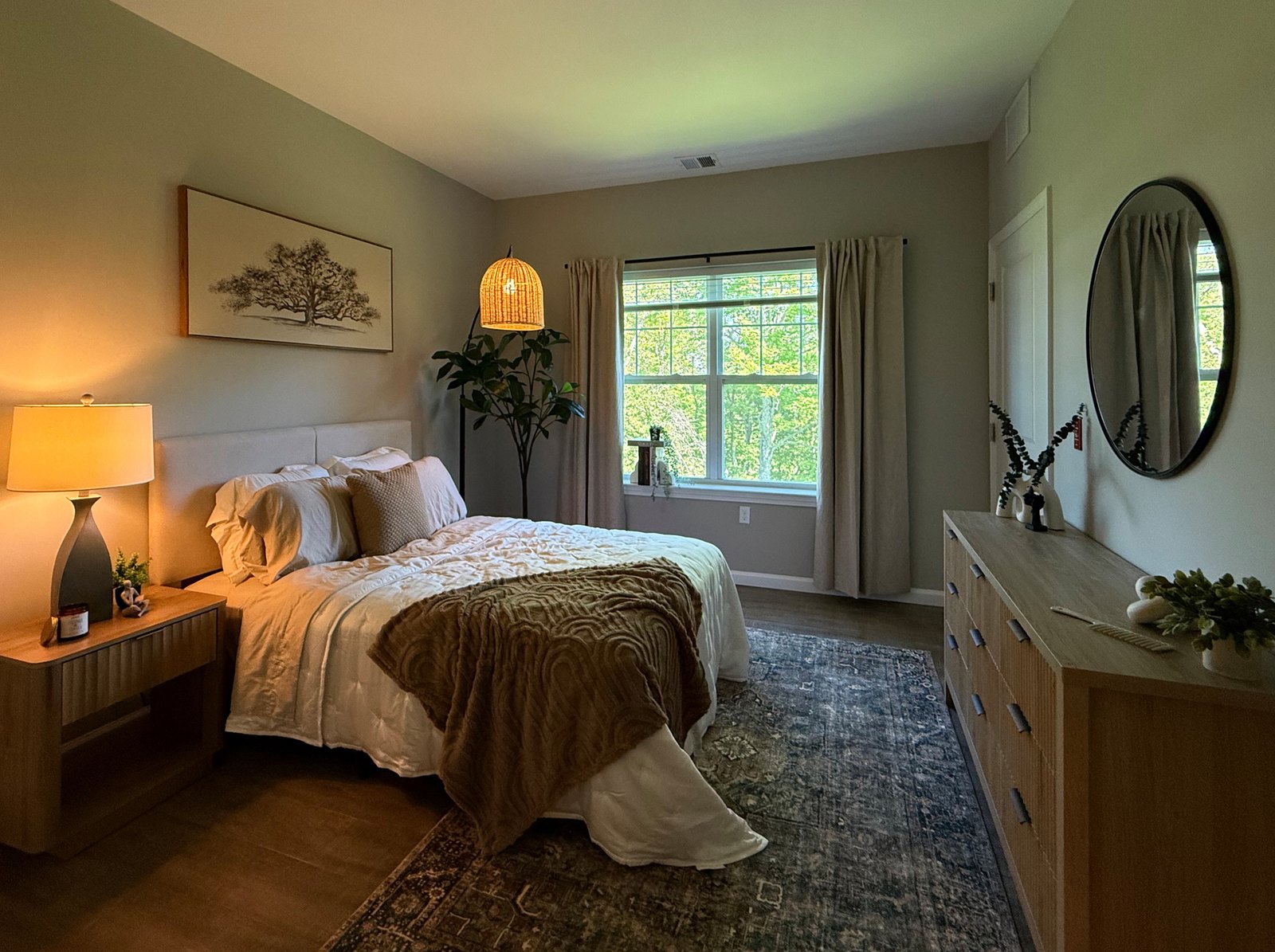
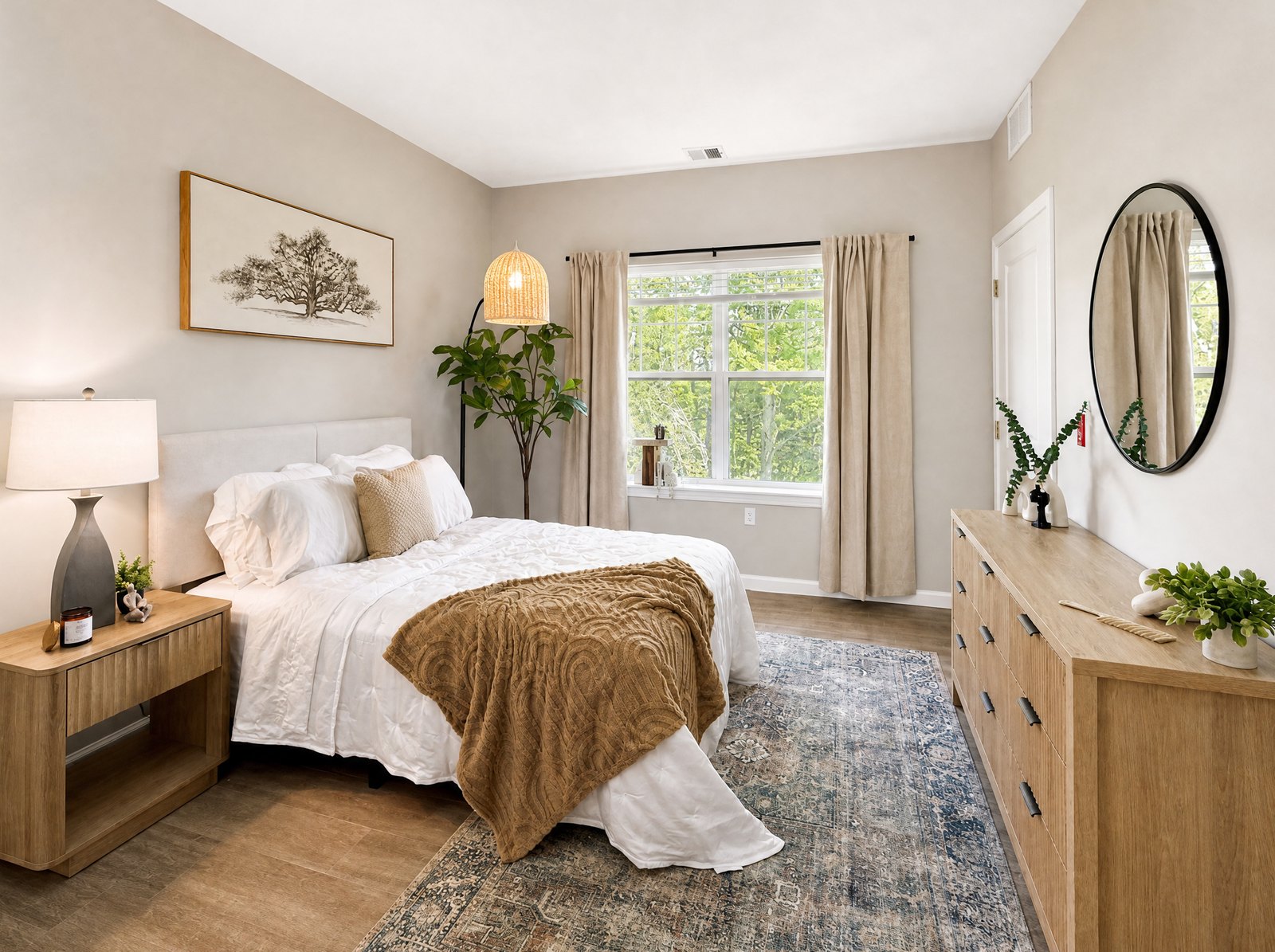
Short answer: To take real estate photos with an iPhone, prep each room, turn on every light, hold the phone at about chest height and keep it perfectly upright so walls stay vertical. Shoot from corners in landscape, use the 0.5x lens with restraint, and edit only for light and color, never the house itself.
I've been photographing homes for almost 20 years and more than 2,500 listings, mostly around Fairfield County, Connecticut. When an agent shows me phone photos that don't work, it's rarely the phone's fault. It's almost always the same handful of habits: shooting from eye level, tilting the phone, going too wide, and leaving the room half lit. Fix those and your photos jump a level overnight.
1. Get the room ready before you raise the phone
Every minute spent prepping a room saves ten minutes of wishing you had. Before I take a single frame I walk the house once and do three things.
- Turn on every light. Overheads, lamps, under-cabinet lights, the range hood, the bathroom vanity. Lit fixtures make a room feel alive and fill in dark corners. Replace dead bulbs if you can.
- Set the blinds. Open them so the room gets daylight, but keep the slats consistent across a wall. Mismatched blinds read as messy in a photo. If direct sun is blasting through one window, tilt those slats slightly to soften it.
- Kill the distractions. TVs off, ceiling fans stopped (a spinning fan blurs), toilet seats down, towels folded, counters mostly cleared, cars out of the driveway.
If you want the full room-by-room version of this, I wrote a printable photo prep checklist.
2. Hold the phone lower than you think
The most common mistake I see is shooting from eye level. From five and a half or six feet up you're looking down at the floor, the furniture shrinks, and the room feels cramped. For most rooms I keep the camera around chest height, roughly four to five feet off the floor. That's high enough to see over a sofa or a bed and low enough that walls look straight and furniture looks like it fits.
Two exceptions: kitchens often look better a little higher, so you can see across the counters and island, and small bathrooms usually need you closer to vanity height so the shot isn't all ceiling.
3. Keep vertical lines vertical
If you remember one thing from this guide, make it this. Walls, door frames and cabinet edges should run straight up and down in the photo. When you tilt the phone down even a little, those lines lean inward and the whole room looks like it's falling over. Buyers notice it even if they can't name it.
- Turn on the grid: Settings > Camera > Grid. Line up a door frame or wall corner with a vertical grid line.
- Hold the phone perfectly upright, not angled down. If you're missing too much floor, lower the phone instead of tilting it.
- Turn on Level in the same menu so the phone tells you when it's straight.
Those two switches are the start. Here's every iPhone camera setting I change for real estate photos, checked against iOS 27.
4. Use the 0.5x lens, but don't live there
The ultra-wide 0.5x lens is the reason a phone can photograph a real room at all, and I use it for most interiors. But it's easy to overdo. The wider you go, the more the edges stretch: chairs near the frame edge get warped and rooms start to look bigger than they are, which sets buyers up for disappointment at the showing.
- Use 0.5x for small and medium rooms, bathrooms, and kitchens where you need to show the layout.
- Switch to 1x for large living spaces, detail shots and anything with a view.
- Keep important furniture away from the very edges of the 0.5x frame.
- Never pinch to zoom. Digital zoom throws away detail. Walk closer instead.
5. Shoot from the corners, in landscape
For most rooms, the strongest angle is from a corner or a doorway looking toward the far corner, so the viewer sees two or three walls and gets a sense of the space. Back yourself into the corner, hold the phone horizontally, and keep it level. Listing sites and the MLS display landscape photos best; save vertical shots for social posts.
Take two or three angles of each main room. You'll pick the best later, and it's much easier than coming back.
6. Work through the house in the same order every time
A fixed route keeps you from missing a room and keeps the final set in a logical order for buyers. Mine looks like this:
- Front exterior first, while the light on the house is good.
- Entry and foyer.
- Main living spaces: living room, family room, dining room.
- Kitchen, including the island or eating area.
- Primary bedroom, then the primary bathroom.
- Remaining bedrooms and bathrooms.
- Bonus spaces: office, finished basement, laundry, mudroom.
- Back of the house, deck or patio, yard.
Not sure how many frames you need? See how many listing photos to take, with a shot list by room.
Shooting your own listing this week? Print my photo day checklist for agents: what to bring, what to do on arrival, and what to check before you leave.
7. Let the camera expose for the room
Bright windows are the hardest part of interior photography. Modern iPhones blend exposures automatically, so you don't need to do much, but a few habits help:
- Tap on a mid-tone wall, not the window, so the room isn't plunged into darkness.
- If the room still looks dark, drag the sun icon next to the focus box up a little.
- Hold still for a beat after you tap the shutter. Brace your elbows against your body or a door frame.
- Wipe the lens. A smudged lens is the hidden cause of a lot of hazy, glowing photos.
8. Edit for light and color, not for the house
Once you've got the shots, the goal of editing is to make the photo match what it feels like to stand in the room: bright, even, true color. That's it. Don't remove the outlet, the crack in the driveway or the neighbor's fence. Buyers will see them at the showing, and photos that misrepresent the home can cause real trouble for an agent. Check your MLS rules on edited photos.
The short version
- Lights on, blinds even, distractions gone.
- Chest height, phone upright, verticals straight.
- 0.5x for most rooms, 1x for big rooms and details, never digital zoom.
- Corners, landscape, two or three angles per room.
- Same route every time, exterior first.
I built an iPhone app, Listing Camera, to handle that last editing step the way I would. You take the photo and it fixes the light, color and exposure in the background, about 30 to 40 seconds per photo, without adding, removing or staging anything. It's free to try on the App Store with 3 enhancements.